Showing posts with label Computer Software. Show all posts

Keep Your Computer Clean and Neat

On: 10/27/2008

'WinUtilitiesOnce again the world leader in the system productivity software development has proved that they still keep up the good work. You can see it for yourself if you download and try WinUtilities 6.2.
Actually, WinUtilities is not a software program, it is a kind of shell that comprises 20 tools that allow users to tune up the operating system and generally speed up the performance of their computers. This award-winning bundle of tools will allow you to perform a breathtaking number of optimization and cleanup operations - from the disk and registry cleanup to protecting your executable files with a password. And it actually does not matter which Windows version is installed on your computer - it can be any Windows version starting from Windows 98 and up to and including Windows Vista and Windows XP SP3 (both for 32-bit and 64-bit systems).
The first and most obvious advantage of WinUtilities is a clear and comfortable interface. All tools are grouped into six categories with clear names.

System Cleaners will allow you to clean up your disks, the registry and all kinds of history files. Though, the first tool already includes lots of masks for temporary and unnecessary files, you can use wildcards to search for custom file types. Of course, you can view all found files before you go to the last step (that is, removing files, moving them to the Recycle Bin or to a separate folder), but even if you delete some files that you may need, the tool can create a Restore Point for you to be able to get back to the state before erasing files. Actually, the same precautions are used when you clean the registry. As to History files, as you may know, the operating system stores a lot of history files and logs about your activities both on the computer and on the Net. Deleting these entries and history files you not only free space on your drives, but also take care of your privacy since history files can tell a power user a lot about what you do with the computer. To crow!
 n it all, the one-click maintenance tool is now available. You can use it to clean up everything with one click without opening each separate tool.


System Optimizers actually deal with "dead" shortcuts and duplicate files. You can remove the former and analyze the latter. Also, you can optimize your memory usage (the program can do it automatically) and your network connection (if you are not sure about these settings, there are recommended options available).

The tools in the System Control categories allow you to actually control your system - from editing your system configuration files (power users would probably appreciate it) and to allowing you to shut down your computer automatically at a certain time. You can also use this category to remove the browser help objects and startup items that you do not need, which also comes in handy since some programs want to run at Windows startup without even you being aware of it.

System Tools actually provide you with access to those tools that are available in the system. But here you can do it in a more pleasant and user-friendly interface of WinUtilities, which is also nice because you do not have to make your way through all those Windows system folders, but can actually access anything from one place. Besides, the system information you can get here will probably be the most comprehensive you've ever seen.

Registry tools will allow you to back up either the entire Windows registry or only certain keys (and later restore them, of course). Besides, you can simply search the registry for certain keys and values. Simple search sounds simple, but it actually provides you with much more search options than the standard Windows Registry Editor.

And at last File Tools. This section offers seemingly simple but still indispensable tools. Here you will be able to view deleted files and, if necessary and possible, restore them on NTFS and FAT volumes. Or you can completely wipe files off with the Shredder tool so that even experts will not be able to restore them. Also you can split large files into smaller ones (for example, to move them to another computer) and glue them back. And last but not least, you can protect any executable file with a password or disable this protection. It can be useful, for example, when you do not want your children to run your business applications or when you do not want other users to open your bookkeeping software on your office computer.

And one more thing - you can schedule almost any operation available in this suite of tools using the built-in scheduler. After that you will not have to worry that you might forget to do something in time. The program will do it automatically.

To sum it all up, the developers of WinUtilities are doing a great job keeping their software as up-to-date and competitive as possible. Whenever they come up with a good idea about tweaking the operating system, the feature is sure to appear among the bundle of tools included in WinUtilities. And the users of this suite will be able to update their software right from it with the Update Wizard built into the program.

System Requirements, Pricing and Availability

WinUtilities works under all Windows versions starting from Windows 98 and up to and including Windows Vista and Windows XP SP3 (both for 32-bit and 64-bit systems).
You can always download WinUtilities 6.2 for free from the developer's site at www.ylcomputing.com. You can try it for 30 days before you make a decision about purchasing it for only $39.99, which is a great price for this bunch of useful Windows tools.

About YL Software

Founded in 2002, YL Software is committed to providing handy solutions to keep users' PCs in order. The company's motto speaks for itself: Your satisfaction is our only goal!

Readmore »».....

SUPERIOR NETWORK VISIBILITY WITH DYNAMICALLY UPDATED NETWORK MAPS

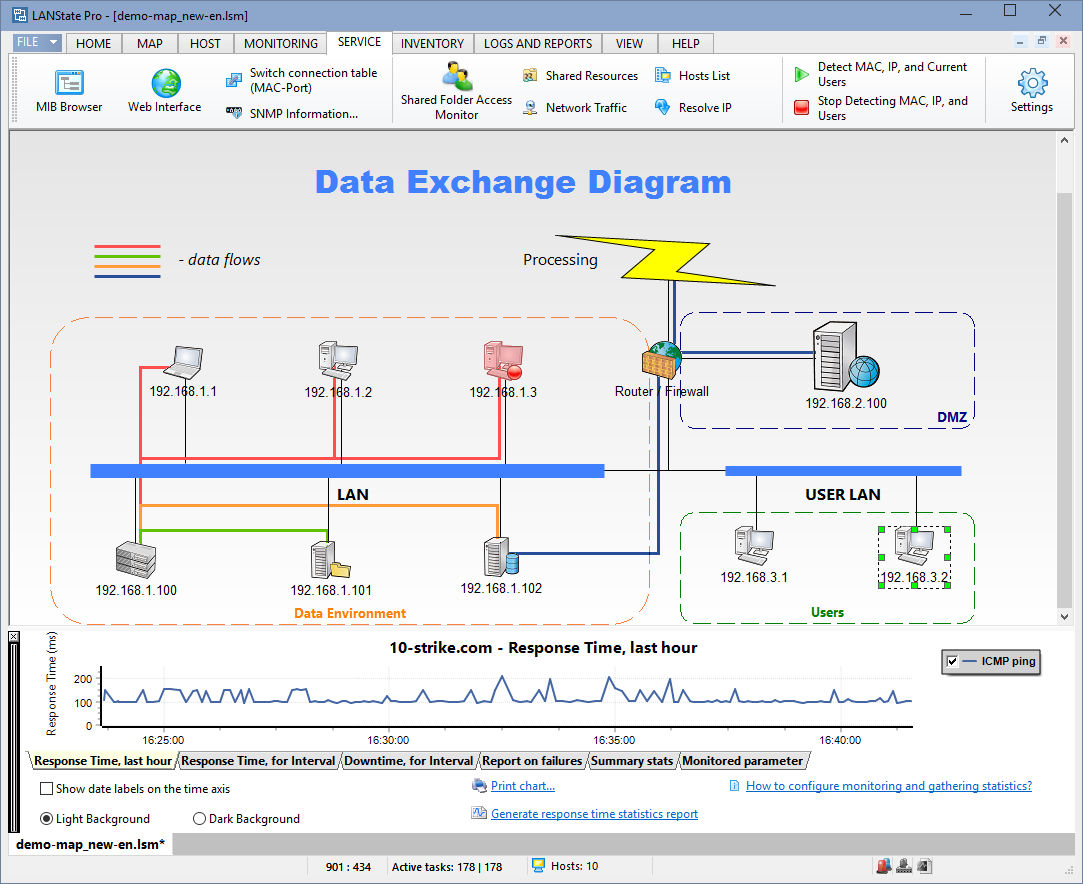
LANSTATE PRO 4.0 LANState Pro 4.0, a Windows-based network mapper and management utility that allows network administrators and engineers to make a graphic map of a network and see its state at any moment. LANState Pro monitors hosts, shared resources, traffic, alerts on specific events and allows administrators to manage remote hosts directly. This helps to reduce downtime dramatically and control the performance of every device on the network with ease.

The power of LANState Pro lies in its unique abilities to discover all network devices - routers, servers, hosts, printers and produce an easy-to-view pictorial map with node icons, connecting lines and labels, representing a network topology. By continuously scanning a network, the program detects active and inactive machines, new devices, and other changes to network configuration, which are instantly reflected in the network map. This map ensures that the network administrator sees what's happening inside the network almost in real time and can respond to critical changes or issues quickly as they occur.
LANState Pro does more than just generating a network map. It allows the user to directly manage networking computers, including starting, re-starting and shutting down remotely, as well as interrogating machines to generate detailed software and hardware asset reports. On miscellaneous events, the program can alert the administrator with a sound, on-screen message, or email, auto-run an external application or reboot a host computer. With a few mouse clicks, the network map can be exported to a graphic image, XML scheme or Microsoft Visio for further use during planning, upgrading or troubleshooting of networks.

Other key features in LANState Pro include sending messages to other networking computers, availability checks, search for devices, scanning hosts and ports, pings, and name lookup.

The product is aimed at network managers and engineers in small and medium-sized enterprises who need good visibility into their network to keep it running with minimal downtime.

"I have used LANState for a month now, and it has allowed me to fix network issues before the users realize it," said Joe Burkhart, LANState Pro user. "It keeps my VPN connections up and monitored at all times, and it allows me to monitor and access printer server and workstation resources all from one place. I have 109 network entities listed so far, and will be adding another 35 later this month. Your software has saved me hours of work being able to work from my desk instead of going to the different buildings and offices to access the resources. The ability to keep my VPN connections alive 24/7 is a blessing in itself. No more rebooting the router to get it to come back up."

Improved Efficiency in Version 4.0

LANState Pro 4.0 includes over 20 new features and bug fixes to help users monitor and control a network more efficiently. The most important features include:

1. Enhanced monitoring with dependent checks - The specified dependency checks must be successfully executed before other monitoring checks can be run. Using dependencies helps to avoid receiving a flood of alerts, when servers, which other checks depend on, are down (VPN servers, routers, etc).

2. Ability to run external applications and scripts - Now the user can run external applications, JavaScript and VisualBasic scripts to monitor performance of network devices.

3. Administrator authorization - New to version 4.0 is an ability to enter administrator credentials to access and manage remote computers (restarting, shutting down, etc.).

4. Enhanced import feature - Map objects can be imported from plain text files that contain IP addresses.

The complete overview of the new features and improvements in version 4.0 can be found on the web-site at http://www.10-strike.com/lanstate/history.shtml
Available now, 10-Strike LANState Pro 4.0 starts at $249.95. A 30-day trial is available.
Read more at http://www.10-strike.com/lanstate/

About 10-Strike Software

10-Strike Software develops network management software for corporate and home users since 1999. Providing innovative solutions, such as Network Inventory Explorer and LANState in USA, Canada, European Union, Russia, the company is helping to automate IT operations, ensure software license compliance and reduce costs. For more information contact 10-Strike Software at +7 (902) 355 83 16 or visit www.10-strike.com.

Readmore »».....

Trust Ultra Slimline Multi Function Power Adapter

The world’s
'smallest

The world’s 

XXL technology in an XXS design. As small as a credit card and as light as a mobile telephone. Trust introduces the Slimline Notebook Power Adapter series: the world’s smallest universal power adapters for charging a notebook, mobile telephone or an iPod. 

Notebooks are becoming extremely popular. However, one problem with their use has always been the large power adapter that you have to take with you everywhere you go. In contrast to the notebook itself, these adapters have remained heavy, cumbersome and awkward to use. Trust introduces the solution: the Slimline Multi Function Power Adapters. This new line of products is not only much lighter, they can also do much more than just charge a notebook.
 
The Trust Slimline Multi Function Power Adapters come with no fewer than 14 different plugs, which can be used to connect any popular notebook model to the adapter. You do not have to buy or order any extra plugs: quick and easy. That is not all, though. The USB plug can be used to recharge USB devices, such as a mobile telephone, an iPod or a navigation system. Furthermore, this device is intelligent. In the past, you had to manually select the voltage, but that is no longer necessary with the Trust Slimline Adapters. Regardless of whether you are connecting a notebook, a telephone or an iPod, the correct voltage is automatically selected. The device is, therefore, safe and simple to use.
 
The adapters are available in 70 Watt, 100 Watt and 120 Watt models and come with a useful bag in which the adapter, plugs and cables can be stored. The 70 Watt and the 100 Watt models are suitable for inserting into a plug socket and for use in a car or an aeroplane. The ultra compact 120 Watt model is only suitable for use in a car or in an aeroplane. The energy-saving design also reduces your energy costs. 


Readmore »».....

SECURE NETWORK DRIVE WITH EXTENDED EXTRA FEATURES

'ReaSoftReaSoft Development announces the immediate release of the new product, ReaSoft Network Drive - solution for both home users and sysops of up to medium-sized enterprises. From now onwards, you can easily connect one or several local folders to the network drive, add encryption, keep all the data in one container file, and much more. 

Just imagine, you have several PCs networked at home or/and at office. Supposing they were all old and out-of-date, so that each of them has just a scanty hard disk volume that seems absolutely useless for you at first sign. However, the situation isn't that desperate. The help is forthcoming by way of ReaSoft Network Drive. With the help of ReaSoft Network Drive you no longer have to waste you free HDD space. This program was designed for connecting one or several local folders to the network drive. Attention please!

With ReaSoft Network Drive you can map more than one folder to the drive that was only imaginable before, since Windows supports mapping one folder to one network drive. From now on, we break the rule. Having ReaSoft Network Drive installed on your computer you can map any amount of folders to the drive. The folders may be even located on different network computers. Of course the usage of the application extends further as here we have mentioned an abstract example. ReaSoft Network drive is designed by ReaSoft Development for rather broad audience. It brings added value for both home users and sysops of up to medium-sized enterprises. 

ReaSoft Network Drive is a unique application owing to its multifunctionality, with the outlined key mission: efficient use of the free HDD space in the network. In spite of the the fact that some features are quite different, they are all unified by the ability to create a network drive using both local and network sources. 

The first function, "Local folders" allows to select several local or network folders and combine them into one network drive. Moreover, sharing and security rules may be set for the drive on the whole, that is, undoubtedly, more practical than setting the rules for each shared folder. As some users may be informed, Windows allows "Map Network Drive" service that maps only one folder to the drive. However, ReaSoft Network Drive removes this restriction. Henceforth, you can map several folders to drive, without any limitations. 

The second "Container file" function permits to keep the content of the virtual drive in one file. What is more, using this function one may set the size (fixed or variable) and specify the path to the container file. The additional feature, supported by this type of file is data encryption. Thus, the user may store his or her top secret data in one encryption protected file.  

"Multi-located container file" is almost the same as "Container file" with the difference that the former supports creation of several container files and allows to locate them on different local drives or network folders. As a matter of fact, a multi-located container file is divided into several parts located on different network computers that makes the file unlimited in volume since you may add a new folder at any time. 

All in all, ReaSoft Network Drive is a valuable software for those who access network drives in a computer network, ranging from small home networks to medium-sized corporate networks. 


System Requirements: 
Windows 2000 / XP / 2003 server / Vista ( full 32-bit & 64-bit editions support )


Pricing & Availability:
ReaSoft Network Drive is available for free download and evaluation at http://www.reasoft.com/products/networkdrive/
The price of registering program is 49.95 US Dollars. 


Screenshots: http://www.reasoft.com/products/networkdrive/screens.html
Download link: http://www.reasoft.com/downloads/ReaSoftNetworkDrive.exe
Order link: http://www.reasoft.com/products/networkdrive/order/


About ReaSoft Development:
Founded in 1999, ReaSoft Development is a IT company specializing in producing highly efficient, well-made and user-friendly software to meet the needs of both business professionals and amateur home users.

Readmore »».....

Protect your copyright and upload to Flickr with PicMarkr Pro

'FlickrRidgebuck Inc. has announced the release of PicMarkr Pro, a tool that enables a user to add watermarks to images and upload to Flickr.com. With its user-friendly interface, PicMarkr Pro promises to become absolutely essential for those who want to quickly and easily post their pictures on the internet and protect the copyright.

PicMarkr Pro allows adding various watermarks, including text, logos and even images. This provides limitless opportunities; here are just some of them:

- protect the copyright. It's even easier, as PicMarkr Pro allows to add watermarks to a group of pictures, so there is no need to bother oneself adding the same logo again and again;
- add comments. Funny, wise, thought-provoking. Favorite poem. Just any.
- add images. Superimposing one picture on another may have really impressive and intriguing results.
  PicMarkr Pro enables user to manage all the properties of a watermark (transparency, font, background, etc). What's more, with PicMarkr Pro it's possible to rename a large number of pictures with just a few clicks. It also allows rotating or resizing several of photos at the same time.
Those who use Flickr can benefit from PicMarkr Pro to the fullest. It becomes a handy tool, which lets a user upload pictures directly to Flickr. Not only does it save time and effort, it also enables a user to import the photos directly from Flickr, add the watermarks and upload them back to Flickr. And the best thing about it is that the filenames, descriptions, tags and comments to the photos are not affected in any way. In other words, PicMarkr Pro allows replacing a photo with its watermarked copy, and no information is lost. 

No wonder this program has already drawn the favorable attention of the Flickr users. 
The first version of the product was released on the 27th of December, 2007, and was mentioned at LifeHacker.com, WebWare.com and many others. That version was a web application available for free. It can be found at http://picmarkr.com. The application has already been used by more than 30 thousand Flickr users. 

Pricing and Availability

PicMarkr Pro runs under Windows® 98 / ME / 2000 / XP / 2003 server / Vista and costs $21.99 (US) for a single-user license. Licensed users are entitled to the fully-functional copy of the software and free upgrades to all 1.xx versions. For further information on the product, please visit http://picmarkrpro.com/

Product page: http://picmarkrpro.com

Readmore »».....

Create stunning buttons for your web site!

'ButtonKristanix Software has released Button Shop 4, the most professional tool for designing web buttons. And version 4 takes a major step up with a bunch of new features! With Button Shop, anyone can make beautiful, memorable buttons within minutes.
You don't have to hire a professional to make your web site or program look good. Impress your visitors with cutting edge Windows Vista buttons. Capture the shining Mac-style aqua look for your web site. Button Shop even creates the custom HTML that you need to make these buttons function on your web site, and this new version also includes a menu maker.
The program comes packed with more than 250 professionally designed, ready-to-use button templates and background textures, and with version 4 it now includes thousands of icons. Just add your own text to the button, and you're done.
Unlike most button tools, Button Shop doesn't rely on static images as templates. Every effect is dynamically created as a vector image and is fully customizable for optimal quality. Fine-tune every detail of your button, from colors to shape. Want a mirror reflection of your button? No problem, just click one button.
The latest release of Button Shop now adds a complete menu maker, that automatically makes the HTML you need to create menus and sub-menus. If you are working on large projects, version 4 now includes loads of productivity additions so you can easily modify, preview and save all your buttons at once. Button Shop 4 contains these and tons of other new features.
Button Shop supports all popular image output formats, including BMP, GIF, JPEG, PNG, TIFF, EXIF, WMF, EMF, ICON, and even Animated GIF and Animated TIFF. The generated HTML and CSS is 100 % validated.
Whether you're a web designer who needs to create stunning web buttons efficiently, a business person who needs to make your site look better than your competitors', or a hobbyist who wants to impress friends and family with your artistic prowess, Button Shop has the tools that you need.
Button Shop 4 runs on Windows 2000/XP/2003/Vista, costs $39.95 (US) for a personal home-license, and $99.95 (US) for a 3-user business-license, and may be purchased securely online from http://www.kristanixsoftware.com/. The program comes with a 30-day money-back guarantee. Multi-user discounts are available. You can download a free fully-functional trial version from the same web site. For more information, contact Kristanix Studios ANS, Gravdalveien 2, 3420 Lierskogen, Norway. http://www.kristanixsoftware.com/

Readmore »».....

Work More Efficient and Have More Free Time Than Ever With LeaderTask

'LeaderTaskImagine, a person with a tight schedule runs a small business or manages a project; or he is a self-employed person and has to schedule his work time so that there is enough free time for spending with the family and friends. Often it's quite difficult to plan a flexible time-table and to perform all the duties on schedule. Deadlines looming and the work is only half way done. It's not a problem any more! LeaderTask 58 will solve all the problems in a given time frame as quick as never before. 

Almeza Company nnounces the release of LeaderTask v. 58 - a new version of a smart business organizer for modern people that will help organize time, increase the activity effectiveness, minimize the routine, remove strain from business, get rid of fuss and reveal the deposits of free time. LeaderTask 58 is not only a business organizer, but also a Personal Information Manager, Calendar, an Address Book and a Contact Manager. "A small case that allows me to keep all those one-time pieces of information off my mind. You work with the program like this: you write it down and forget it. Then you see it and do it. I liked the easy task overview, including strategic goals and tactic plans", says Vladimir Anastasin, CEO, FastSoft - company's client. LeaderTask is a unique personal business organizer with new conceptual management of tasks, projects, time and persons activity. The software will replace scattered paper notes, colored stickers on the PC screen and other out-of-date time management methods. Now all the plans and tasks will be stored in a safe place. By just hitting Ctrl+Alt+A it is possible to add new tasks or to view the current ones. The software is constantly at hand and on the lookout in the windows tray icons. All the LeaderTask features have their special tags that help to filter the needed tasks. Thus, by just one mouse click the user can quickly open: "Me Today", "IMPORTANT", "URGENT", "Monthly Sales", "Project XYZ In October", "Delegated Tasks Monitoring", "Bank", "To Buy", "To Read", "Year Goals" and more. Besides, it's possible to adjust LeaderTask the way most convenient for the user. LeaderTask also allows applying the David Allen's GTD (Getting Things Done) methodology. 

What's more, any task in LeaderTask can be applied to any context most convenient for the user. The context can be in form of a place (home, office, bank etc.), a contact (boss, employee, wife/husband), or a category of a project. To put it simple, any task can be applied to its context - in the most convenient circumstances for its performing. If the task should be performed in the bank, it's better to fill it into the "Bank", if a task is extremely important it should be assigned with a correspondent priority and so on. 

LeaderTask is: an aid for the PC memory, as it's difficult to keep large amount of information in mind; a visual overview and full control of the user activities; always at hand, as it's easy to access the organizer with the help of hot-keys; a storage of absolutely any information (documents, diagrams, images); a customize interface (customize the position the main toolbars, format the task tree, color task categories, specify options and more); a ready solution (new skills teaching, new implementation in the form of educational training course); a software with an individual approach. LeaderTask is like a personal manager or secretary for a user. 

Other features include displaying tasks in a form of a tree, and a calendar; filtering tasks, reminders, comfortable navigation, personal information manager, user interface and flexible settings, password manager, file container, link manager, data backup and more.

LeaderTask is used to automatically keep record of all operations - those of the PC user, his family or company. LeaderTask will automatically generate a schedule for the user, taking into account all the projects and tasks. The program will considerably increase the level of the user business and personal time organization. Now all the thoughts and plans will be in a stable system.

LeaderTask has a portable-version, thus the user will have the software always at hand wherever he is. Portable-version can be written on a flash card, it requires no installation, therefore all the data is stored and saved in its folder. 

By purchasing the software, the user gets a license key that automatically makes him a participant of marketing stocks with a chance to win a prize. By the use of the main license, the user can form additional license that will help his relatives purchase the product license on a lower price. LeaderTask helps organizing things more efficiently without wasting the person's time!

Pricing and Availability

LeaderTask v. 58 is compatible with Microsoft Windows 2000/XP/Vista, Intel Pentium II and higher, with 64 MB RAM and 15 MB on the hard disc, mouse or touchpad required. 

Software link: http://www.leadertask.com
Download link: http://www.leadertask.com/download/leader.exe

Readmore »».....

SoftAmbulance Partition Doctor Recovery Software

'SoftAmbulanceSoftAmbulance announces the release of Partition Doctor, a comprehensive data recovery tool to restore data from damaged hard drives and repairing the disks to a working state. SoftAmbulance Partition Doctor saves time and efforts required to re-install Windows and applications by allowing its users to recover data and fix disk corruption at home without sending the disk to a data recovery service.

SoftAmbulance Partition Doctor features a set of innovative algorithms that make the recovery possible for more than 300 types of files, pictures and documents even if the hard disk is severely corrupted. Conventional data recovery applications fail to recover files from a disk with missing or badly damaged file system. SoftAmbulance Partition Doctor features Deep Search, a technology that locates files on a damaged disk even if the file system is missing or corrupted. Deep Search uses low-level disk access to scan the entire surface of the damaged disk in order to match data against an extensive database that defines more than 300 types of files. Deep Search is able to detect the beginning and end of each file, making it possible for Partition Doctor to recover much more of the user's data than other recovery tools. 


Recovering user's data from damaged disks is only a half of what SoftAmbulance Partition Doctor can do. Partition Doctor recognizes all types of system structures, including TFS, FAT, MFT and MBR, and fixes them in order to restore the disk into fully operational condition.

SoftAmbulance Partition Doctor is designed to make disk recovery as safe as possible, minimizing any chance of further corruption. Partition Doctor is able to make a precise image of a damaged disk. Working with that image makes any repairs easily reversible, allowing to try different recovery strategies to achieve the best result.

The advanced recovery features make SoftAmbulance Partition Doctor a perfect choice for advanced computer users and data recovery specialists, while the simple step-by-step wizard allows everyone to repair their disks at home completely automatically without risking their data.

A free evaluation copy of SoftAmbulance Partition Doctor is available for free download at http://www.softambulance.com/

Readmore »».....